Plan the week
Swap a dinner
Here’s what to do if tonight’s dinner isn’t right for you, and how to undo it.On the Week page, each day appears as a card showing the dish, cooking time, portions, shopping needs, and who’s home. The small Swap button with an arrow lets you see other options for that day. You’ll also find this button on tonight’s card on the Home page.When the card is open, the arrow turns and the button changes to Keep it.If someone at the table is having a different meal from the main dish, their initial shows up in the row. When you open the day, you’ll see a sentence under the table with their name. Tap it to see what each person gets and why.Tap Recipe to go to that day’s recipe, with the tips under the steps.In cook mode, you can tap a person to hide their softer tips. After that, they show only as a count for that day, including in the recipe. Safety and allergy tips always stay next to the step.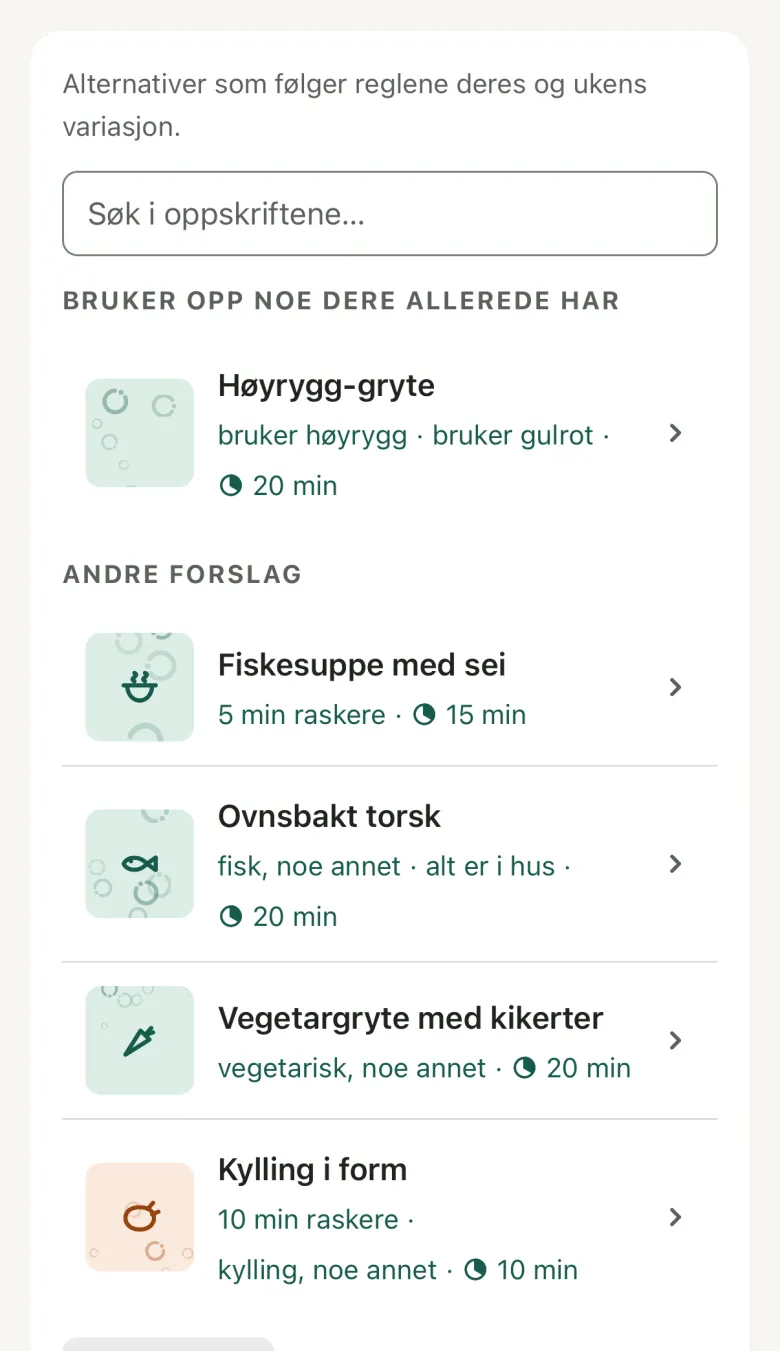 Open Details on a suggestion to see the ingredients, how many of them need buying, and a rough line per portion with calories, protein, and “five a day”. Rough estimate from the foods Bryti knows.Below the list, you’ll see Or: Eating out and Leftovers. Just tap one, and your day is set.When you choose eating out, it’s added to the date as an event. If you delete the event, the day becomes open again.
 Bryti finds a dish that fits the wish, within your rules and allergies, then shows you a suggestion to accept or reject. If you ask “what are we eating this week?” the week appears in the chat. There, Swap on a day opens the same swap card.
Swap for something else
- 1.Tap Swap for the day. You’ll see the same card no matter if you’re on the Week page or chatting with Bryti about the week.
- 2.Tap a dish to view it before you choose. You’ll see why it fits, such as being quicker or using food you already have, and anything to watch out for. None of these dishes is planned for another day this week. Tap Swap to this one to make the swap, or Full recipe to read the recipe first.
- 3.If none of the options work, use the search field above the list. From your cookbook shows recipes you’ve added, and From the starter library shows the ones that come with Bryti.
- 4.You can also tap Suggest more for new meal ideas that fit the day. This uses credits, and the price is shown on the button.
Open Details on a suggestion to see the ingredients, how many of them need buying, and a rough line per portion with calories, protein, and “five a day”. Rough estimate from the foods Bryti knows.Below the list, you’ll see Or: Eating out and Leftovers. Just tap one, and your day is set.When you choose eating out, it’s added to the date as an event. If you delete the event, the day becomes open again.Worth knowingBryti keeps track of the leftovers you note after dinner and can plan a leftovers night. If you want this more often, turn on Prefer leftover dinners in Bryti’s settings. Then, leftovers night will be about every third day, but never on Friday or Saturday.
Use up what’s running out
If something in your pantry should be used soon, the dishes that use it are listed under Uses what you already have, just below the search field. Each dish shows what it uses, and the ones that use the most come first.Sometimes, the suggestion is tonight’s dish with just one ingredient swapped. This is a smaller change than choosing a completely new dinner.Tap the dish to look at it, then tap Swap to this one. Bryti updates your shopping list. The usual suggestions for the day are under Other suggestions.Move, remove, lock
More for this day includes Move to …, which lets you trade places with another day or move to an empty one. Remove the dinner clears the day. Lock means Bryti won’t change the day when planning again, and a locked day has no swap button.After you swap, move, or remove a dinner, Undo appears at the bottom for a short time. Bryti updates the shopping list instead of creating a new one, so anything you’ve already checked off stays checked.Say something about the dish
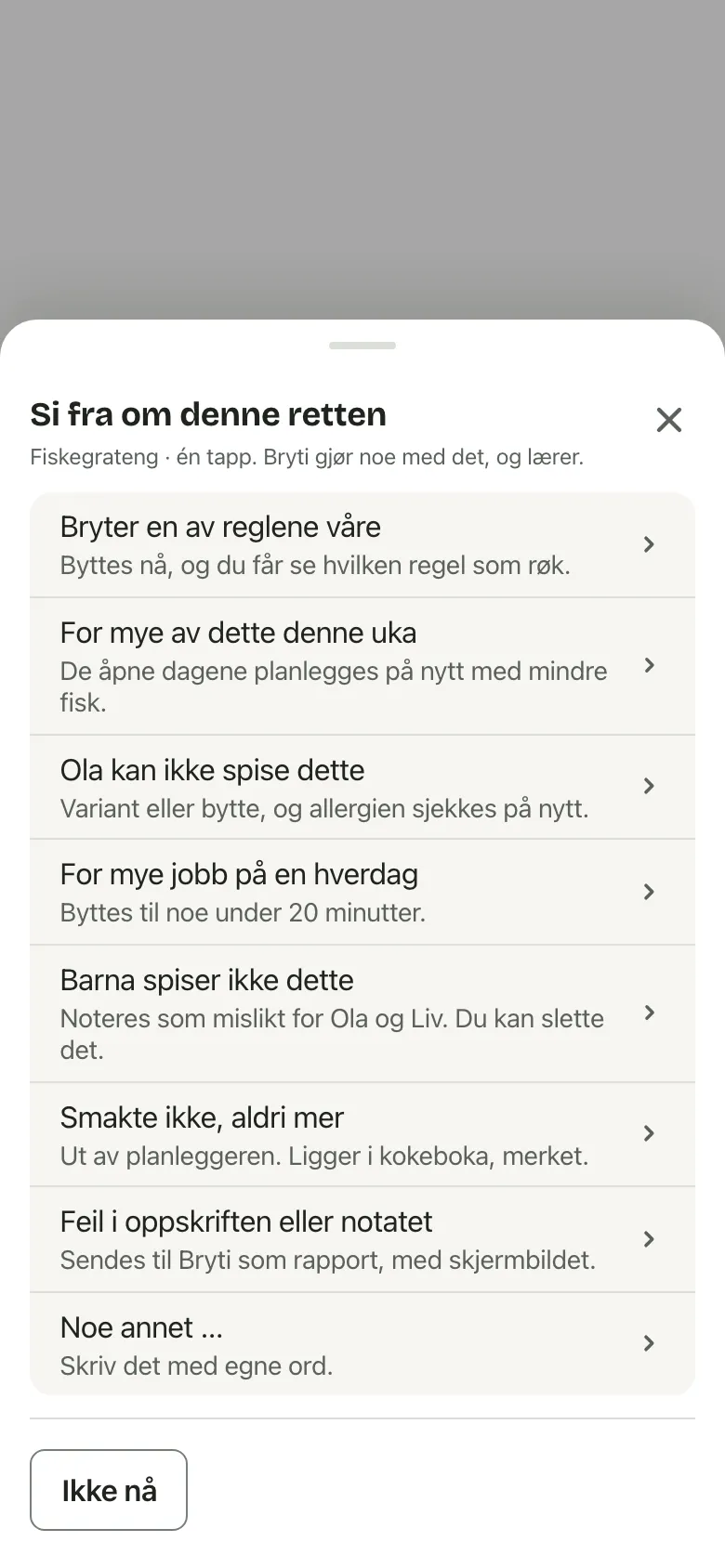
Use Say something about this dish on the card to give feedback. Maybe the dish breaks a rule, the kids won’t eat it, or you never want it again. Each reason explains what Bryti will do, and Bryti acts on it right away.Swap in the chat
Swap Thursday for something with fish
NoteOnly adults can swap meals. Juniors see the plan but not the buttons. If a Junior asks for a swap in the chat, it becomes a card that an adult needs to accept.
Go to Week
Opens in the app